My Obsidian setup
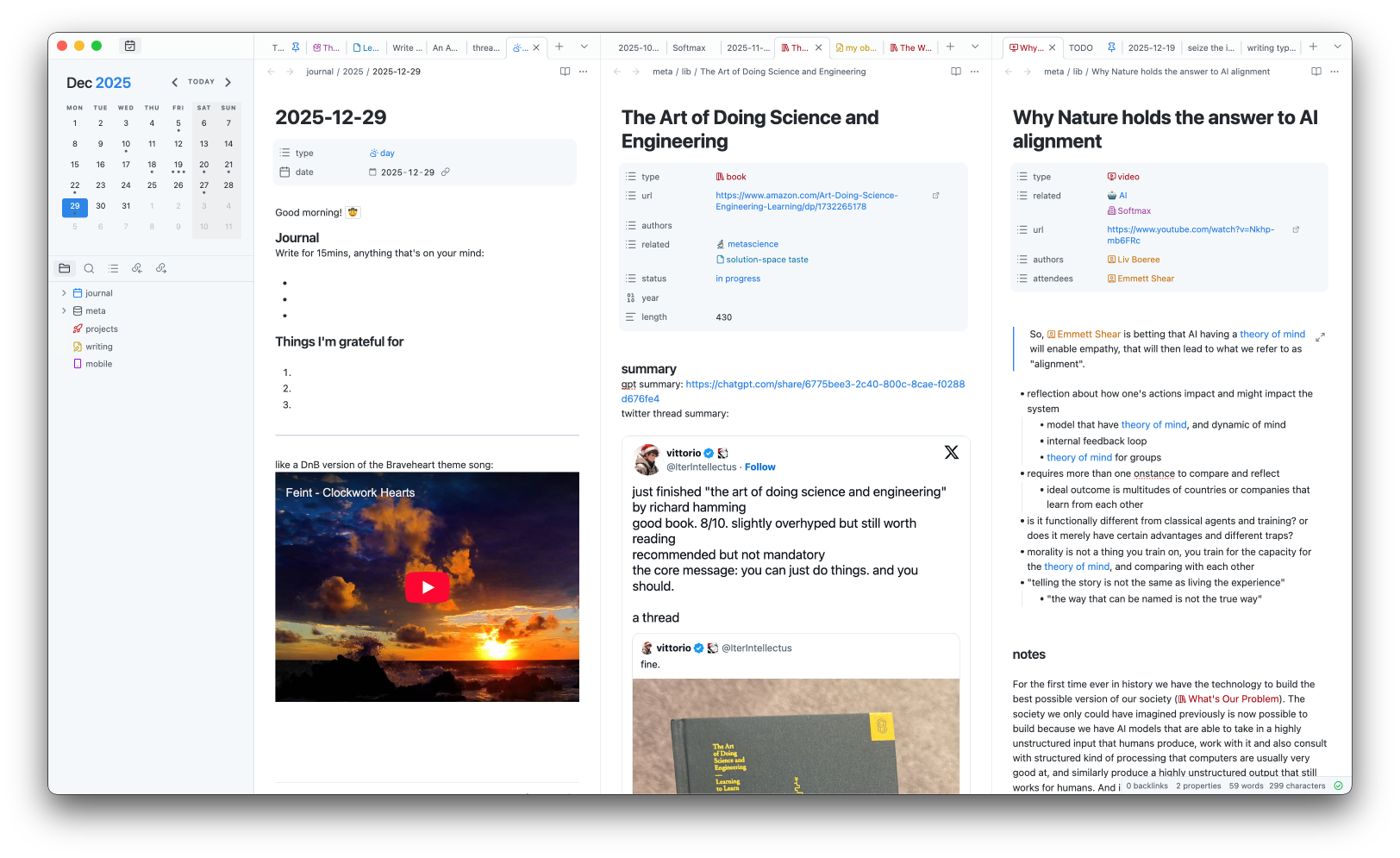
An overview of my Obsidian setup and how I use it.
The repo with the template vault is on Github: https://github.com/abstractalgo/obsidian-vault-starter
principle
The main guiding principle for how I approach working with Obsidian (or any PKM) is: use the minimal amount of functionally orthogonal features.
The idea is to always have exactly one way of achieving any particular thing, which then helps remove the mental overhead of having to choose between multiple different options that are functionally similar, and that would otherwise introduce inconsistencies and chaos. It also means turning off any and all features that I don't actually use actively, to keep the surface area of the things I have to think about to a minimum.
This way of thinking is borrowed from my background in programming, where normalization, decoupling and orthogonality are good practices for building simple, maintainable, portable and extendable systems, and the mindset translates well when having to deal with knowledge management and note-taking.
There are some interesting consequences of this approach:
- I don't use tags because I'm able to replicate all of their capabilities with just basic links and notes. (I really don't understand the hype with tags in general.)
- The overall folder structure is extremely flat. Thanks to that, I don't ever have to waste my time on figuring out folders.
structure
meta/lib/ is practically where all of the notes live. And it's completely flat, with no nesting whatsoever.
mobile inbox
I have an Android app installed, but I find it too confusing - there's like 5 different sidebar panels and navigation menus, and I never bothered to figure it all out. It's overwhelming, and for my needs, unnecessary.
My use case with the mobile app is to quickly record something, with either voice or text, so I can recall it later and expand its details further. I don't use the phone as the actual note-taking device.
I liked Tana's "Inbox" feature for mobile, to help record things quickly, but those notes aren't meant to stick around long term. So I replicated that in my Obsidian setup, by having a mobile note at the root, that's always easy to find and access, and is permanently opened in my Android app. I then revisit it on the desktop and move its content from there to actual notes.
I use Android's built-in "Share" to put links and tweets into that mobile note and I revisit them later at irregular intervals in a desktop app.
plugins
A quick overview of the (notable) plugins I use.
- backlinks
- daily notes
- bases
- sync
- properties
- templates
- supercharged links
- dataview
- quick switcher++
- abbreviations expander
- calendar
templates and properties
It took me a while to settle on which properties to use and what their structure ought to be:
I tried following my main principle as much as possible, but there's still a bit of room to improve, with the main challenge being whether to name and shape a property based on what it is (i.e. its syntax) or how it's used (i.e. its semantics). An example might be naming a property "email" vs "contact".
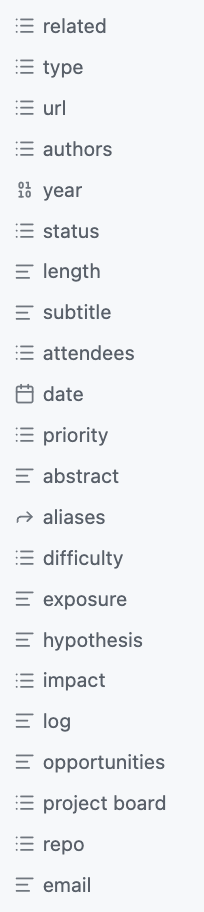
Templates that I have:
Tana has the concept of "supertags", which basically make a note "an instance" of a particular (super)tag, i.e. it inherits from it and also stays connected to it. So, when a (super)tag gets updated, all of its instances also get updated.
This is not how Obsidian's templates work - templates are just a starting point. Still, they manage to cover 99% of my needs.
(The colors come from supercharged links plugin.)
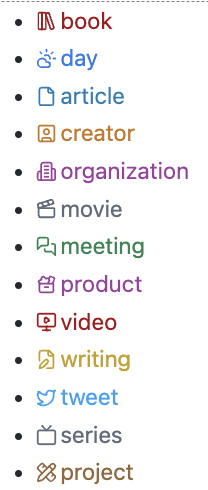
on backlinks and related
I have a "related" property on all notes (see the first screenshot as an example) - it's a general-purpose place to link with other notes; it's a manual "link" action. This is by far the main mechanism that lets me connect my knowledge across the notes.
I wish there were an easier way to mix this "related" property with native backlinks and links. Their semantics are extremely similar, but they are still treated as three completely different features, which can be slightly annoying sometimes.
bases and dataviews
Bases are a good addition and I'm starting to use them more. I still prefer the fact that Dataview doesn't pollute the global scope with all the queries/views, and I can just make more queries inline. This extra step with Bases makes me rely on them far less, so I still use Dataview over Bases very often.
graphs and canvases
I very rarely use either local or global Graph views, even though I am extremely big on canvas-based UIs. (In fact, I even built an entire graph-based app all the way back in 2018., before graph-based UIs were common - Nodebook.) Graphs in Obsidian suffer from their layout being too fluid and not reliably stable/persistent. Filtering and coloring are very limited and have a really poor UX.
Canvas also suffers from poor ergonomics and an extremely limited set of features.
It's clear that these features are not the primary way for interacting with one's notes. Still, I see a huge potential in these.
I also never got used to Excalidraw plugin.
styling
I keep all of my styling in a single custom.css.
I even copied the theme's CSS into it. This means that all of my CSS is always fully "flattened" and syncable, so I never have to worry again that some part of CSS might be missing. (At some point, I had issues with styles syncing, and I've kept it all in a single CSS file out of precaution ever since.)
I use Hider plugin to remove stuff from the UI.
I also removed and customized some stuff via custom CSS. The favorite thing I customized is to treat list properties as actual list items (so they show below each other, as block items) instead of inline span pill items:
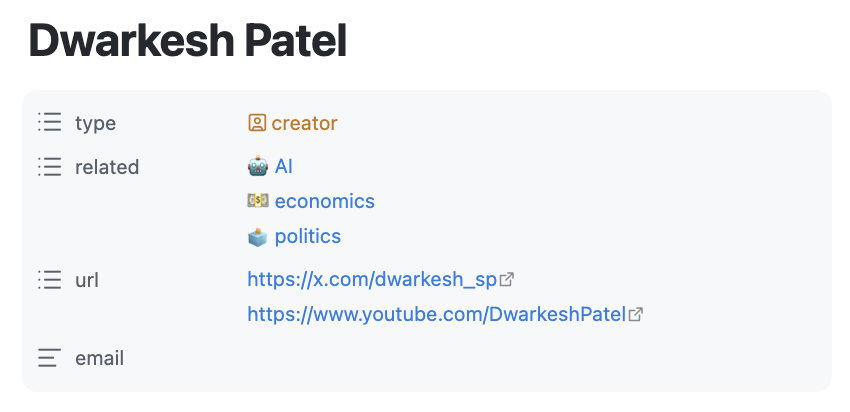
(This is unfortunately broken with Bases table visualizations because there the table view puts a fixed height on all rows.)
I use Iconize to have icons in the sidebar, but I will eventually get rid of it and just have it directly encoded in my custom CSS.
toggle/collapsible blocks
I also created my own toggle blocks (i.e. collapsible block) with callouts and a bit of CSS. In plain Markdown they look like this:
How it looks rendered:
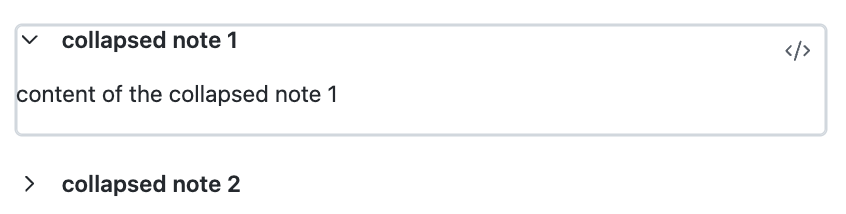
These blocks are folded by default, but can be expanded on click.
supercharged links
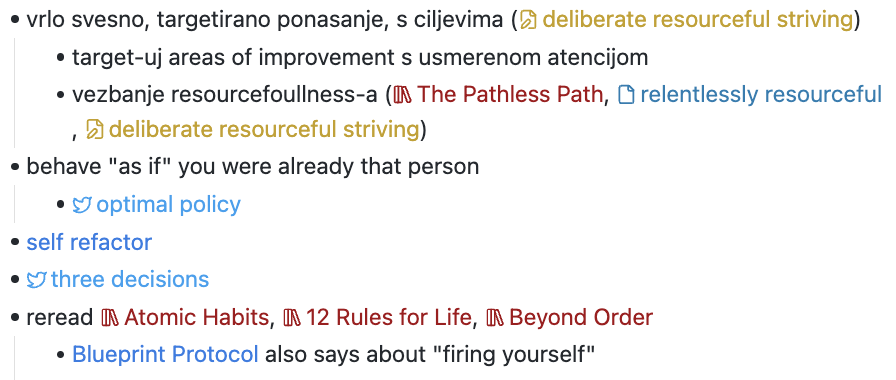
Supercharged Links is perhaps my favorite plugin. I saw colored links first in Tana, and I missed it so much in Obsidian, and it took me a while to find this plugin and customize it so that it works as I expect it to. It's the only plugin I sponsored the authors with actual money - I like it that much!
I customized them by prefixing each type with an icon via CSS.
Things can get quite colorful:
sync
I gladly pay for Sync's functionality, and also as a way to support the Obsidian team. I like that it has version history (not that I use it a lot, but it did help me more than once).
tasks and TODOs
I don't have any complex system for tasks, nor integrations with, say, Google Calendar.
At best, I have a "TODO" note with a checklist of items, but that's about it; I simply don't use Obsidian for complex task management and prefer to do it elsewhere.
other plugins
Calendar is simply nifty for some more visual overview (I liked it from Tana) of the daily notes. Similar to Tana, a daily note is the primary "location/parent" where a note is being linked - this lets me "record a note at a point in time" and create a sort of timeline. Regardless, all notes actually live in meta/lib/, and are optionally linked to from other notes and other daily notes.
I use Abbreviations expander to convert and insert some special symbols (-> for →, -- for an em-dash, >= for ≥ etc).
I recently started using Quick Switcher++ plugin for the sole reason of being able to search both files and commands (by prefixing it with >) at the same time, because I'm used to it from VS Code.
next
I feel there's a very large opportunity to use more AI-based capabilities. I currently don't use any, even though I gave a shot to a few things here and there.
On the side, I am also exploring the UI/UX on how to successfully and holistically integrate AI into PKM tools, and I don't think any of the tools or plugins are doing a particularly fantastic job.